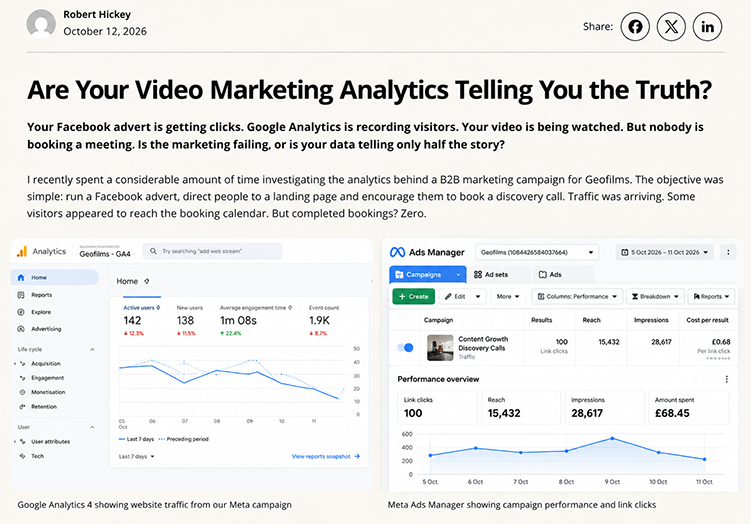
Plenty of clicks. People arriving at the website. Not a single discovery call. If you manage B2B marketing, this may sound painfully familiar. The temptation is to blame the advert, the video or the landing page. But what if the numbers you’re using to make that judgement don’t describe the same thing?
We encountered this problem while reviewing a Geofilms campaign: a Meta advert sent visitors to our Content Growth landing page, where they could learn about the offer and book a conversation through Cal.com. The advertising and website reports suggested activity, but the calendar wasn’t filling up. That discrepancy prompted us to investigate how the journey was being measured.
There was no single, proven explanation for the missing bookings. We needed to distinguish a weak proposition or awkward booking process from a measurement gap. And that turned out to be a more useful lesson than another colourful dashboard.
Why do Meta Ads and Google Analytics show different figures?
Because a click, a landing-page view, a session and a booking are four different events. Meta can report link clicks and landing-page views, subject to the metric selected and the tracking available. GA4 records sessions and user interactions under its own rules. A person might click twice, close the browser before a page loads, decline tracking, or return later from another source. None of those behaviours makes the two platforms’ figures directly interchangeable.
Attribution and reporting settings can complicate the comparison further. Ad platforms may credit outcomes to campaigns over different attribution windows, while GA4’s reports use their own attribution definitions. Dates, time zones, filters and consent choices also matter.
The question is not ‘Why are the totals identical?’ They probably won’t be. It’s ‘Do we know what each number means, and can we independently verify the business outcome?’
Where do Google Analytics and Meta Pixel tracking problems start?
A website can accumulate tracking through WordPress plugins, Google Site Kit, Google Tag Manager, a directly installed Google tag, a cookie-consent plugin and platform integrations. Having several tools is not automatically a problem. Sending the same event more than once, or failing to send it at all, is.
A button click might be counted as a ‘lead’ even though all it did was open Cal.com. A page view might fire twice. A confirmation event might never make it back to your main website because the visitor completed the action on another domain. Or a consent setting may correctly prevent part of the data from being collected.
Google recommends checking existing tag installations before adding more. Use Google Tag Assistant and Tag Manager Preview to confirm what fires, when it fires and whether it fires more than once. In GA4, use Realtime and DebugView to check which events actually arrive.
Do video views tell you whether a campaign is working?
Not by themselves. Platform video views can tell you that content attracted attention under that platform’s definition. They don’t tell you whether the right buyer understood the message, trusted the offer or took a meaningful next step.
There is also a technical trap: GA4’s enhanced-measurement video events are designed for supported embedded YouTube videos with the JavaScript API enabled. You should not assume that every Vimeo, self-hosted or custom video player will automatically produce useful video_start, video_progress and video_complete data. Those players may require additional event tracking.
For a B2B campaign, we’d rather know whether a relevant prospect watched a service explainer, went on to a case study and requested a conversation than celebrate ten thousand unspecified views. Watch time is a clue. An enquiry is an outcome.
What has UK cookie consent got to do with your analytics?
Quite a lot, but the rules deserve more precision than ‘all analytics needs consent’. Under the UK’s updated rules, the ICO describes a narrow statistical-purposes exception for certain aggregated website or service-improvement measurement, provided its conditions are met, including clear information and a simple, free way to object. It is not a blanket exemption for every GA4 configuration or every analytics product.
The exception does not cover advertising measurement, individual tracking, profiling or passing identifiable conversion activity to advertising partners. Those uses generally require appropriate consent for the relevant storage or access technologies. UK GDPR obligations may apply separately.
Google Consent Mode helps eligible Google tags respond to consent choices; it does not replace the need for a lawful, correctly configured consent setup. Depending on whether basic or advanced mode is used, Google may receive no pre-consent data or limited consent-aware signals. That means gaps and modelled figures can coexist with a compliant setup.
A real Geofilms case study: 287 Meta landing-page views, six GA4 sessions
Updated 12 October 2026 after a hands-on investigation of our own website. The following figures are from real reports, not the illustrative dashboards pictured earlier in this article. They also explain why we no longer take a reassuringly colourful graph at face value.
On 12 October, our latest Meta advert, launched on 9 October, was showing 287 landing-page views and £32.05 in spend. Yet our connected GA4 property reported only six sessions starting on the Content Growth page and nine views of that page in the 9–12 October reporting period. Some of those GA4 sessions came from our own Tag Assistant tests.
Important: Meta landing-page views are not unique people, GA4 sessions are not page views, and the campaign dashboard and GA4 extracts were not independently reconciled to identical cut-off times. This comparison is a substantial warning sign, not proof that precisely 281 visitors vanished into the internet.
What we actually found
1. Two cookie-consent systems were competing for attention. WordPress had both CookieYes and WPConsent active during our earlier troubleshooting. Two consent managers can send different instructions about whether analytics may run. We disabled WPConsent, retained CookieYes as the consent interface and used the WP Consent API to bridge consent choices to the Google Site Kit integration. We verified that analytics consent remains denied by default until a visitor grants it. The coexistence was a genuine configuration concern, although we cannot prove it caused every missing visit.
2. LiteSpeed Cache was postponing more than we wanted. The site’s performance plugin was marking Google tracking and consent-related scripts as deferred JavaScript. We added targeted exclusions for the GA4 loading sequence, Google Tag Manager and the CookieYes/Site Kit consent scripts. The first change was not enough: LiteSpeed’s Guest Mode, used for visitors who are not logged in, still deferred them. Only after adding the corresponding Guest Mode exclusions and clearing the cache did we verify that the relevant scripts were served without LiteSpeed’s deferral. This matters because the website can behave differently for an administrator and a first-time visitor. LiteSpeed documents both exclusion settings.
3. A connected reporting tool had its own blind spot. We linked a third-party data connector to the correct Meta advertising account and to GA4. It successfully retrieved older campaign data, yet its feed did not show the new October advert even though the advert was plainly active in Meta’s own dashboard. A forced refresh was unavailable on the connector’s trial plan. The lesson? Before declaring an advertising campaign dead, check the original platform and the date range, not just a convenient all-in-one reporting screen.
The test that finally told us something useful
We opened the Content Growth page in a fresh private browsing window, accepted cookies, waited, refreshed the page and watched GA4’s Realtime pages report. It showed /content-growth/ and one recorded page view; after another refresh, the count increased to two.
That was the first clear demonstration that a consented page load could generate a GA4 page view after our changes. In one snapshot GA4 also showed four active users but only one view. Those numbers describe different metrics; they are not four visits mysteriously squeezed into one. Nor does a successful test establish that every real advert visitor is now counted correctly.
We had also noticed that GA4 could show user_engagement and scroll events without a visible page_view in an earlier Realtime snapshot. That’s a reason to check the Realtime pages report and, where appropriate, Tag Assistant or DebugView instead of guessing that an entire tracking installation is broken.
What another small business can learn from this
- Test as a new visitor. Use a private window, not just your logged-in WordPress browser. Check what happens before consent, after consent and after a refresh.
- Check script optimisation as well as your tags. If you use LiteSpeed, investigate JS Deferred/Delayed Excludes and Guest Mode JS Excludes. Don’t copy someone else’s exclusions blindly or turn all optimisation off without testing.
- Respect a visitor’s choice. Google Consent Mode changes tag behaviour according to consent. Do not ‘fix’ low numbers by silently switching analytics or advertising consent to granted. Google’s setup guidance explains why ordering and consent updates matter.
- Compare like with like. Use matching dates, time zones, page URLs and campaign tags. Separate the period before a tracking repair from traffic after it. Missing historical GA4 events do not magically reappear when a setting is fixed.
- Measure the final outcome. A visitor clicking ‘Book a call’ is not the same as a confirmed Cal.com appointment. Test the booking completion and campaign attribution separately from landing-page views.
So, was the problem LiteSpeed or cookies? We corrected real risks in both configurations and demonstrated that page-view tracking works in our controlled test. We have not established that those changes explain the entire gap between Meta and GA4, or confirmed how many genuine leads the advert produced. The next step is to compare fresh, consent-aware traffic over the following 24–48 hours and check actual bookings.
If you run a small B2B business, that distinction is worth remembering: fix the measurement before you redesign the marketing. Otherwise you risk firing the advert for a crime the analytics committed.
How do you measure the journey from Meta advert to confirmed booking?
First, draw the journey before opening a dashboard. For our campaign, the useful sequence was advert engagement → landing-page visit → meaningful video or page engagement → booking-button click → Cal.com visit → completed appointment. Each stage needs its own definition.
Advert click. Useful for understanding how persuasive the creative and targeting may be, but not proof someone read the landing page.
Landing-page visit. Check whether the page loaded and whether the visit was measurable. Look at relevant traffic sources, not merely all website visitors.
Video and content engagement. Measure supported video progress or meaningful interactions where appropriately configured and lawful. Don’t turn ‘played a video’ into a sales-qualified lead.
Calendar open. Indicates interest in the next step, but could also reveal confusion or booking friction. It isn’t a booked call.
Booking completed. Confirm the appointment exists in Cal.com. Where appropriate, pass the confirmed outcome into GA4 as a key event and use it in advertising reporting only where technically justified and lawful.
One detail is especially useful with Cal.com: its booking pages can capture standard UTM parameters. But when a visitor moves from your website to a separate booking URL, you need to check that campaign parameters are actually carried through to that booking URL. Don’t assume the attribution follows them automatically.
Five checks before spending another pound on the campaign
- Set one meaningful goal. Decide whether you want a qualified discovery call, an enquiry or another measurable outcome. Don’t optimise solely for cheap clicks.
- Audit the tags. Check which GA4 and Meta integrations are active, how events are named and whether any fire twice.
- Test the entire booking journey. Open the advert’s tagged landing-page URL, proceed to Cal.com and complete a controlled test booking. Confirm which events appear and which don’t.
- Repeat with appropriate consent choices. Verify that rejected consent is respected, and understand what data cannot be recorded under that choice.
- Review the audience and the offer. If tracking works but bookings remain low, test the proposition, proof, page clarity and calendar experience before making another video simply because the first one didn’t convert.
So is the advert failing, or is the tracking wrong?
Possibly neither. Possibly both. That’s the point. The absence of bookings is a real commercial result; the marketing dashboards may explain it imperfectly. A video advert can attract attention without attracting the right buyers. A great landing page can lose people at a calendar. And flawed measurement can make a good campaign look poor — or a poor one look wonderful.
The value of accurate analytics isn’t a prettier report. It’s knowing what to test next. When you’ve separated attention, engagement and confirmed outcomes, your video strategy can be shaped by evidence instead of dashboard optimism.
At Geofilms, we plan video, photography and content around the questions B2B customers need answered before they make an enquiry. We also believe measurement belongs in the brief, with specialist technical support where needed. Because ‘the video got lots of views’ is a lovely thing to hear. It’s less lovely when the diary is empty.
Robert Hickey
Founder and Director, Geofilms
Want your content to lead somewhere useful? Explore our Content Growth approach or start a conversation about your B2B content strategy.
Sources and further reading
- ICO: Exceptions for statistics, consent and advertising tracking
- Google: How Consent Mode works
- Google Analytics: Enhanced-measurement video events
- Google: Audit existing tag configurations
- LiteSpeed: JavaScript deferral and Guest Mode exclusions
- Google Analytics: What Realtime pages counts
- Google: Implementing consent updates on websites
- Cal.com: UTM parameters on booking pages